
Preface
Preloaders in Flex are not like preloaders in Flash. Gone are the days of the 1 liner:
if ( _framesloaded < _totalframes ) gotoAndPlay ( 1 );
We now have base classes and setter properties. While you may have to write a class and then set that class on your Application’s preloader property, it’s really pretty easy once you do it more than once. This tutorial will show you how to build a preloader in Flex using a Flash built animation.
Introduction
Flex’ built in preloader is pretty sweet. It auto-adjusts for your application’s color to stand out, it handles all aspects of preloading. This includes remote shared libraries, fonts, and even deferred classes used in modules. Finally, it deals with the initialization of your Flex application which can possibly take longer than a few milliseconds.
If you are building branded applications, every little detail counts in enforcing your brand identity upon your user. You want to remind them the positive experience they are having was brought to them by you. Nothing is more important than a first impression, and the first thing people see in a Flex application is the preloader. It is important that you spend adequate time on making it look good and consistent.
To make a custom preloader for Flex, you have to do 2 steps:
- Write a class that extends DownloadProgressBar
- Set the preloader property on your Application class to your preloader class.
No witty 3 step process here.
The purpose of extending DownloadProgressBar is to handle the various things that happen in the life cycle of preloading (yes, we have life cycles now, not just downloading of bits). You do not have to handle anything save the FlexEvent.INIT_COMPLETE. You could for example put some dots who are ridin’ spinnaz and that’s your preloader.
…or, you could handle all events, and duplicate the Flex one with a different design showing the download & initialization progress.
The steps for making a custom Flash Preloader for your Flex app are as follows:
- Make a 100 frame MovieClip. TextField optional (as is everything).
- Give MovieClip linkage ID with no class name.
- Compile your SWF (“Test Movie”)
- Write your own Preloader class in Flex Builder which uses your Flash MovieClip.
- Set the Appliction.mxml preloader property to your custom class.
Making Your Flash Symbol
In Flash, you make a MovieClip that is 100 frames long. This will be the preloading part of your preloader, the MovieClip that shows the progress of the SWF downloading. Notice I have both a 100 frame animation as well as a dynamic TextField. The TextField will have the percentage numbers (i.e. “73%”) put into it dynamically.
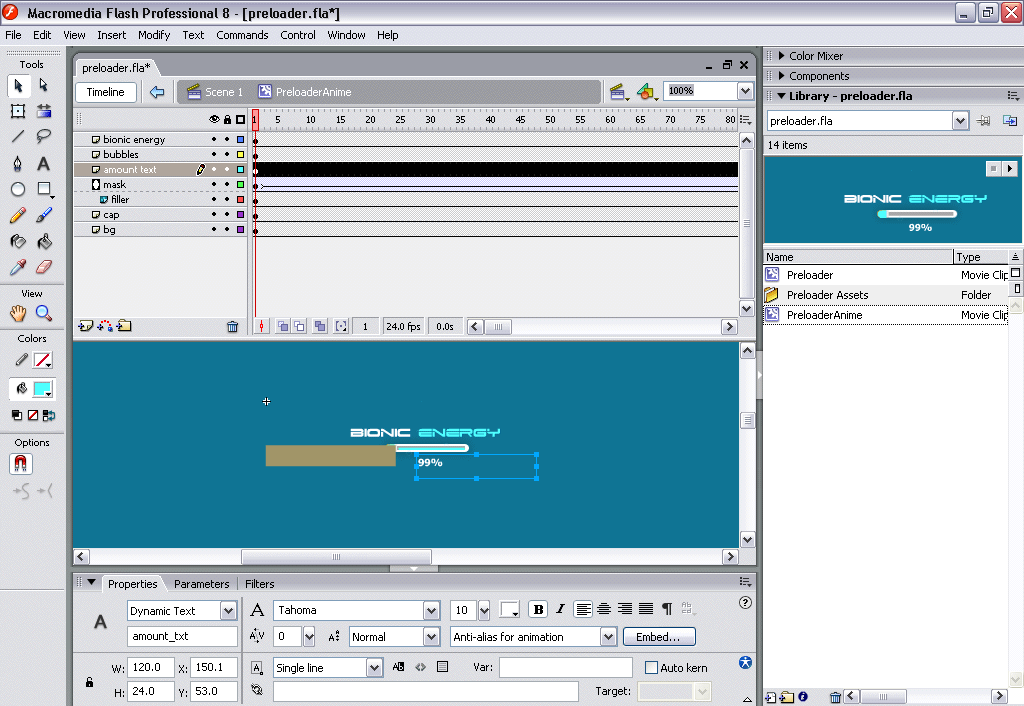
Notice, also that the TextField has an instance name. This is so I can target it with code. Keep in mind, even though we are giving the TextField an instance name, we’ll be targeting it with code in Flex. We won’t be writing any code in Flash.
Finally, I wrap my preloader in a MovieClip because I want the preloader to fade out when it’s done.
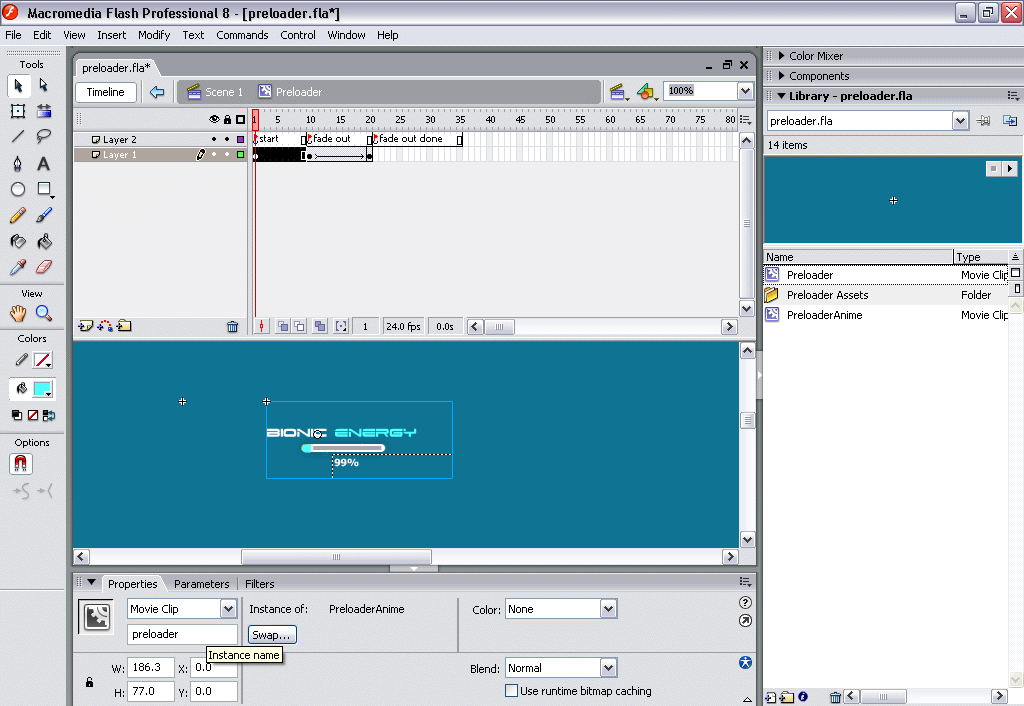
I make sure to give the preloader an instance name so I can “dot dot down” to the preloader through the animation. Dot dot down is Flash slang for using dot syntax to walk down the display tree to target a MovieClip you want to interact with via code. In our case, it could be:
_root.my_clip.preloader.amount_txt.text = "70%";
Omg, I used _root, lol, l@mz03, me fired.
Finally, you export your Symbol with a linkage ID. Exporting as Flash 8, AS2, you just fill in the linkage ID class. Don’t export as Flash 9, AS3. If we did that, we might as well write the class for the preloader , and that’s just too much work, and too much added file-size for a class that’s supposed to be simple and most of all lightweight. If you are using Flash CS3, just change your publish settings to Flash 8, AS2 or AS1.
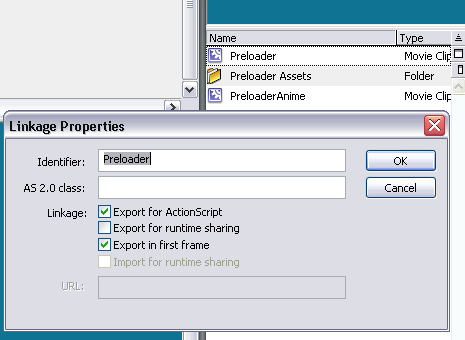
Flex will look for this linkage ID name when you are embedding the MovieClip. Now compile your SWF and your done.
Custom Preloader Class
You then write your own Preloader class. Have it extend mx.preloaders.DownloadProgressBar. There are multiple ways to embed Flash content. For our purposes, we’ll embed to a class property.
If you look at the Preloader’s setter function, you’ll see we get a Sprite (1 frame MovieClip) that emits all the preloading events we’ll care about. In this case download progress, when the SWF has finished downloading, when the SWF starts to initialize classes, and when initialization is complete.
Our download progress & SWF download done functions will dig down into the Flash MovieClip, and show download progress in both the text field, as well as making the preload MovieClip symbol animate via gotoAndStop based on the download percentage. Since download percentages are 100%, it makes it pretty easy to figure out what frame to go to.
The initialization ones just show “Initializing…” in the TextField.
Unlike most Flex preloaders, we want ours to animate when done, and only THEN actually launch into our Flex application. You can accomplish this by not dispatching the complete event. Dispatching this let’s the Flex application know the preloader is done. In our case, we want to wait till the Flash animation is done before doing so. We add a framescript ( a function called when the Playhead reaches a frame) to frame 21. When the animation is done, it’ll hit this frame, call our preloader class’ function. This will stop the animation and dispatch the event, letting the Flex application know we’re ready.
Conclusion
That’s it! Keep in mind it’s hard to test these things locally on your box. In Flash, we have the bandwidth profiler, but there is no such thing in Flex. You can either use network throttlers, like Charles. Alternatively you can upload the files to your site, install the Firefox Web Developer Toolbar, and choose disable cache.
In the next part, we’ll be taking advantage of Flex as a statefull client, and getting all the data you need. This takes time, so we need a cool way to show this to user as well as making it fail gracefully.
Flash Preloader in Flex – Example | Source | ZIP
Jesse, man, you don’t have to make tutorials just for me. Seriously. I mean, I know I need schoolin’ from time to time, but let’s not make it personal!
Thanks for this tutorial. As always, I think you’ll make as great a father as you will a developer!
Leif
July 21st, 2007
Naw dude, 3 people in 2 weeks asked about it so I figured I’d might as well write about it.
JesterXL
July 21st, 2007
Great article! Thank you
Dreamer
July 22nd, 2007
Good stuff! Something I have been meaning to try for a while.
Thanks.
Nick Selvaggio
July 24th, 2007
[...] Jesse Warden has a great new article about developing a custom Flex preloader using Flash (a cooler preloader as he calls it). He also has a new look for his blog that you can now read (just kidding Jesse). Jesse’s post relates to my previous post regarding Error #2025. When I developed a custom preloader in Flash I made the terrible mistake of using a Flash 9 component that caused a huge error in my Flex app. Jesse’s post is part 1 of 3, so look forward to subsequent posts. [...]
Better (Cooler) Flex Preloader
July 26th, 2007
[...] Jesse Warden’s cool Flex preloader tutorial. [...]
Some interesting stuff « The Algorithmist
July 31st, 2007
Awesome stuff! There are caveats you may want to consider. I fixed them when using your example.
1. Your preloader overwrites the event Listeners, but you leave them once your application is loaded. This is ok if you never load anything else into your flex application. When loading a module into your application, flex will fire the FlexEvent.INIT_PROGRESS event again causing an error due to the clip.preloader becoming null.
2. Solution:
Instantiate a private variable called _preloader in your constructor;
Remove the listeners once the application is loaded and you are complete;
Regards,
Tony
Tony Alves
July 31st, 2007
Thanks,It was helpful for me.But I wanna create custom context menu.Can u post me some of examples or some hint.
Anurag
August 6th, 2007
Hello Jesse, thanks for the posting. But I have hard time to reference to the text box as in the code
clip.preloader.amount_txt.text = “Initializing” , I keep getting error on property preload not found.
I surely give it a instance name for the movie clip in flash 8.
Is this the problem that I have to use CS3 and save backward compatible as AS2? Thanks ahead.
Mark
Mark
August 10th, 2007
hey i tried doing the tutorial but i get an error when my preloader comes in. this is what i have:
ReferenceError: Error #1069: Property preloader not found on Preloader_FlashPreloaderSymbol and there is no default value.
at Preloader/::onSWFDownloadProgress()
at flash.events::EventDispatcher/flash.events:EventDispatcher::dispatchEventFunction()
at flash.events::EventDispatcher/dispatchEvent()
at mx.preloaders::Preloader/::timerHandler()
at flash.utils::Timer/flash.utils:Timer::_timerDispatch()
at flash.utils::Timer/flash.utils:Timer::tick()
anyone have a clue?
Mizzle
August 13th, 2007
I think that’s because the flex can not reference to the object name inside of flash. Need the Guru to clear the way.
Mark
August 17th, 2007
Hello, I am getting the same problem as mizzle. Would you mind posting the sources for your flash preloader so that we can have a easier time modifying it for our needs? Thanks so much!
chizuoka
August 22nd, 2007
Thanks for this great tutorial, i was waiting for it for a long time!
but i have the same error 1069 than the others above…
Maybe you could provide us a example .fla for help?
Ninog
August 22nd, 2007
Actually i resolved it!
you have probably sets your 2 layers (with flags and fade out) directly on the stage. Try to wrapped them in a movie clip. It worked for me, the scene is empty and in my library i have a movie clip (named PreloaderAnim) and another movie clip (Preloader, used in PreloaderAnim) which is linked.
Hope that’s help and sorry for my english if i made mistakes!
Ninog
August 22nd, 2007
Anyone solved that problem please? Jesse? Would you do mind giving us a sample fla?
chizuoka
September 4th, 2007
I am confused about movie clip structure.
How many movie clips are used 1 or 2? (For Loader and wrapper)
Please give Source flash file for above mentioned tutorial.
Shuklendu
September 25th, 2007
Hey Jesse,
Really loved the tutorial… could you post the .fla file? i think there are a lot of people trying to build on this example, and when they try and build something custom in flash, they aren’t wrapping it the same way you did…
i think the .fla would clear everyone up…
it would for me anyway…
thanks you
Axel
Axel
September 30th, 2007
Sorry for the delay peeps. I cannot give the FLA since I don’t own the graphics, so I made a new one. This one, built like I describe above, works as well. I downloaded the source, saved the FLA in assets/flash, recompiled the preloader.swf to use the new one from this FLA, and she works on my Flex 2.0.1, Windows XP, Eclipse 3.1, Java 1.5. FLA is saved as Flash 8 (built in Flash CS3, but saved in case yall don’t have CS3), exports Flash Player 8, ActionScript 2.
Any probs, let me know.
Download Preloader FLA
JesterXL
September 30th, 2007
Hey Jesse,
Have you tried the preloader in FLEX 3 Beta 2? I am getting an error when I try to use it in an AIR application and working through it right now. Was hoping you might shed some light on how to get it working with AIR.
Thanks,
Tony
Tony Alves
October 15th, 2007
I do now know how build the .fla in flash
I use flash 8 professioal,and as this tutorials, and also JesterXL says on “September 30th,2007 at 10:49 pm”,I download the “Preloader FLA”, use the FLA, I republish it in flash 8 professional, then copy the .swf to my flex project directory,and use the Preloader.as In my project, It works very well;
So it proves my environment is OK;
Then as this tutorials, and as your .fla does, I make a new .fla in my flash 8 professional ,publish it ,copy .swf to my flex procect, then In Preloader.as ,change the “[Embed source="/assets/flash/preloader.swf", symbol="PreLoader")]” to “[Embed source="/assets/flash/preloader.swf", symbol="MyPreLoader1")]“,and recompile my flex project, it is OK, but when I run the flex project, get the wrong message as follows:
TypeError: Error #1034: Type Coercion failed: cannot convert Preloader_FlashPreloaderSymbol@435fcf1 to flash.display.MovieClip.
at Preloader$iinit()
at mx.preloaders::Preloader/initialize()
at mx.managers::SystemManager/http://www.adobe.com/2006/flex/mx/internal::initialize()
at mx.managers::SystemManager/::initHandler()
Why it is Ok using your .fla, but it does not work using my own .fla??
But In flash 8 professioanl, I make it the same as your .fla as fowllows:
1. make a new flash project, named as preloader.fla;
2. In this flash project, make a new Movie Clip symbol, and only one frame, put a dynamic text in it , then set the Movie Clip Linkage to “MyPreLoader1″, set the Publish setting: Flash Player 8, Actionscript 2.
Why it does not work using my .fla??
Then I want to know what is the Tips on making a new flash??
mill888
October 15th, 2007
Now I found the problem.
If the symbol only have one frame, It will not work as I had said.
But I now find a new problem.
The amount_txt does not show the progress number when progressing,only show 99% at last.
It can not show the pregressing number 1~98% when progressing.
Why?? I think the problem is not that the swf file will be loaded is very small.
To debug this problem , I change some at the function onSWFDownloadProgress as follow:
if(p
mill888
October 17th, 2007
Now I found the problem, but a new problem.
If the symbol only have one frame, It will not work as I had said.
But I now find a new problem.
The amount_txt does not show the progress number when progressing,only show 99% at last.
It can not show the pregressing number 1~98% when progressing.
Why?? I think the problem is not that the swf file will be loaded is very small.
To debug this problem , I change some at the function onSWFDownloadProgress as follow:
if(p
mill888
October 17th, 2007
Now I found the problem, but a new new problem.
If the symbol only have one frame, It will not work as I had said.
But I now find a new problem.
The amount_txt does not show the progress number when progressing,only show 99% at last.
It can not show the pregressing number 1~98% when progressing.
Why?? I think the problem is not that the swf file will be loaded is very small.
To debug this problem , I change some at the function onSWFDownloadProgress as follow:
if(p
mill888
October 17th, 2007
if(p
mill888
October 17th, 2007
if( p
mill888
October 17th, 2007
Now I found the problem.
If the symbol only have one frame, It will not work as I had said.
But I now find a new problem.
The amount_txt does not show the progress number when progressing,only show 99% at last.
It can not show the pregressing number 1~98% when progressing.
Why?? I think the problem is not that the swf file will be loaded is very small.
To debug this problem , I change some at the function onSWFDownloadProgress as follow:
[code]
if (p
mill888
October 17th, 2007
How to insert program script in this comment??
In onSWFDownloadProgress, change “if(p
mill888
October 17th, 2007
At last, I would say the amount_txt does not show the incresing number from 1~99%, it only at last show 99%.
Why??
mill888
October 17th, 2007
Hey mill88, figured your first problem out (I hope). If an embedded symbol has 1 frame, it is considered a Sprite and cannot be cast to a MovieClip. If it has more than one frame, it appears to be considered a MovieClip.
guitarstrummr
November 7th, 2007
[...] Jesse Warden(Making a Cooler Preloader in Flex: Part 1 of 3) [...]
Better check Flex Showcase again….
November 26th, 2007
How to use in flex builder 2, but occur a error
It´s necessary using AS3
on
[Embed(source="/assets/flash/preloader.swf", symbol="Preloader")]
MArcio
December 14th, 2007
Can you send me please the preloader.fla file i don’t have experience in flash. Thank you.
LUCAS
January 23rd, 2008
Hi Jesse, I had an error as described above. I renamed my symbol from Preloader to Preloader2, I think the class name being Preloader doesnt like the symbol being the same or something. Anyhow, that error went but then a new ‘Type’ error arrived when trying to convert clip to FlashPreloaderSymbol as in line 35 – clip = new FlashPreloaderSymbol(); – anyone else get this. Very frustrating having to abandon this. Tried casting to no avail. word..
m davidson
January 25th, 2008
Hi guys,
You have to create and publish you fla with Flash 8 and not CS3 in order to work. I made the test and its ok
Benoit
January 28th, 2008
Hey,
nice tutorial! I need to play an Animation, before the actual download progress bar is displayed. When the application is loaded from the cache, the download progress is done instantly. But the intialize phase of my application is so heavy, that the Animation is not played smoothly. What can I do? Can I delay the start of the initalize phase from the preloader?
Lars
January 31st, 2008
Hi,
Great thanks for the tutorial. It’ve helped me a lot.
It works good.
Sajkat
February 2nd, 2008
@mc davidson & Benoit
If you replace “private var clip:MovieClip;” by “private var clip” in the class Preloader.as you can use a swf exported from CS3.
Hope this could help
bLb
February 13th, 2008
[...] one of the projects I was working on, we used the custom preloader class by Jesse Warden. This way we were able to define our own preloader and it works great, but ofcours not in IE. The [...]
Flex - Custom preloader IE stageWidth - stageHeight problem fixed
February 15th, 2008
Hi and thanks for great information! Has anyone got a preloader.fla that can be used in CS3?
Hope someone can help.
Thanks
Chirs
March 2nd, 2008
[...] Warden wrote an excellent article on his blog about “Making a Cooler Preloader in Flex”, which got a lot of feedback from many Flex [...]
Preloader for Flex with RSL support | coding and other fun
March 20th, 2008
Is there anyway to do this with pure AS3?, meaning no MXML? I tried merging this example with the preloader example at http://www.bit-101.com/blog/?p=946, but I couldn’t get it to work.
Chris
April 14th, 2008
Just so you’ll know – your link to “dots” now goes to adult related search site… probably should get updated…
Nathan
May 12th, 2008
[...] Jesse Warden [...]
Tim Ashworth - Flexible Flash » Custom Flex Preloaders
June 20th, 2008
[...] making it easier to debug and maintain. If you’re using Flash content in Flex, you typically turn it off since you’re writing the AS3 classes that wrap the design content in a strongly-typed way. If [...]
Flex and Flash Developer - Jesse Warden dot Kizz-ohm » Blog Archive » Designer vs. Developer: Declaring Stage Instances
June 20th, 2008
Hi
i’ve tried this preloader with an air applcation but i got this error:
TypeError: Error #1009: Cannot access a property or method of a null object reference
has someone solved this problem?
thanks
Paolo
pgianf
August 4th, 2008
[...] Read more [...]
Flash tutorials | Preloader Roundup | Lemlinh.com
September 18th, 2008
Very thanks for your helpfully tutorial, that’s save me so much time.
十分感谢
Jack
November 10th, 2008
Thank You for this helpful tutorial.
Dexterous
December 15th, 2008
[...] what if it wasn’t? My past article on creating a cooler preloader utilized existing Flex functionality. As you create more design heavy applications in Flex 3 or [...]
Flex and Flash Developer - Jesse Warden dot Kizz-ohm » Blog Archive » Making a Cooler Cursor in Flex
January 18th, 2009
[...] http://jessewarden.com/2007/07/making-a-cooler-preloader-in-flex-part-1-of-3.html http://www.onflex.org/ted/2006/07/flex-2-custom-preloaders.php http://iamjosh.wordpress.com/2007/12/18/flex-custom-preloader/ [...]
Custom Flex 3 Application Preloader at Wisebisoft - Adobe Flash / Flex / AIR
February 5th, 2009
Good stuiff..body.
姬无双
March 23rd, 2009
[...] http://jessewarden.com/2007/07/making-a-cooler-preloader-in-flex-part-1-of-3.html « Anyone can write code. Not everyone can throw it away. [...]
Skinning the Flex preloader at Ryan Tan
March 23rd, 2009
Sucks, I see blank blue screen for more than 10 seconds and then a preloader for half a second. Should I see something at the very beginning and then a smooth progress from 0 to 100? Sorry for the ’sucks’ part, I’m struggling with the same problem for days now, I have users leaving because of that blank screen issue.
Jebac
April 23rd, 2009
The only time that happens is if:
- you’re preloader is large; frame 1 will have to download before you show it; however, it’s not larger than frame 2, thus by the time you’re preloader is showing, it only shows for a millisecond.
- you’re not using Flex, but Flash, and have components in the library exported for actionscript; they default to export on frame 1, thus you’re whole app has to dl before it’s shown.
JesterXL
April 23rd, 2009
Hey guys,
I thought I’d hijack this thread to ask a quick question about using the download progress events to measure the client’s bandwidth. The code for doing so seems fairly simple – although the measure is probably not 100% accurate:
private function SWFDownloadProgress(event:ProgressEvent):void {
if(typeof(beginTime)==’undefined’) {
beginTime = getTimer();
beginBytes = event.bytesLoaded;
} else {
kbps = Math.floor( ((event.bytesLoaded-beginBytes) * 8 / 1024) / ((getTimer()-beginTime)/1000) );
trace(kbps + ‘ kbps’);
}
}
Now, I’ve got a measure for kbps with the preload package. But can anyone help me make that variable accessible from the main application? That is, how do I read the kbps variable after the application has been loaded?
Steffen Christensen
May 18th, 2009
Where are the 2nd and the 3rd part?!
Francis
June 4th, 2009
I know this is far off-base since this article was written in 2007, but did you ever get around to making part 2 or 3 of this series? What you describe as being covered in part 2 is exactly what I am trying to figure out for myself right now, but I can’t find anything to help me get there at the moment.
Ross R
July 15th, 2009
[...] Tutaj jest ciekawy opis jak to zrobić. [...]
CustomPreloader we Flexie « Flex, PHP, jQuery i inne pasje
October 18th, 2009
[...] skinning the default Flex preloader – mx.preloaders.DownloadProgressBar – you should continue with Jesse Warden’s great article on the topic. But before proceeding with the implementation of the IPreloaderDisplay [...]
Flex Application Bootstrapping - Totally Custom Preloader
October 22nd, 2009
[...] All our projects use the same preloader. Like many people, we based our preloader on Jesse Warden’s tutorial. [...]
Flex custom preloader does not center « Development scratchbook
January 15th, 2010